
With the clock function in the time report, you can clock your times in real time as an alternative to entering them manually in the time report input view.
If you use the clock function in the time report, you will find an icon for Clock in the time report menu. In addition to clocking in/out for the day or for a break, it is possible to clock In/out overtime, In, Out, Absence out, Absence in, Absence actual day and Change of account code. Which of these clock options are active is set under Administration > Users/Authorities > Roles.
Please note that the role permissions for the clock-in/out options control which options are displayed both when clocking in/out in the timesheet and in the Flex HRM app. In the app, it is possible to clock out for Absence, Absence for the actual day, Clock in/out for overtime, and Change of account code.
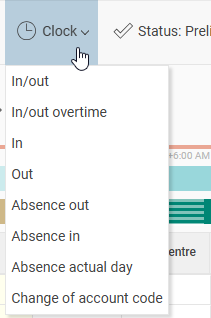
The functionality is the same as when you clock in HRM Timeclock and the app Flex HRM, with possible questions regarding late arrival, etc. For the option In/out the system automatically detects whether a clock in or out should be made: every other time in and every other time out.
The clocking time will be taken from the server where HRM is installed.
Can we disable the option to clock in/out in the timesheet?
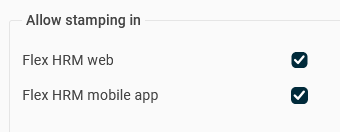
If you want to hide the clock-in/out button in the timesheet, uncheck the setting for allowing clocking in/out in Flex HRM Web. You can do this at three different levels:
- For the entire company: Go to Settings > Time and Plan > Timereport.
- Per time group: Go to Settings > Time and Plan > Time groups.
- Per employee: Go to Employees > Time.
Related Articles
How does the time clock terminal work?
How does clocking work in the Flex HRM app?
Please note: This article is AI-translated. This means that linguistic errors or misunderstandings may occur.