
Flex HRM uses account code registers to control authorisation and to tag items, such as items for accounting and statistics.
You can create new registers and customise them to suit your requirements. Two registers can be extended, a project register and a customer register. This article describes basic registers that are not extended.
An account code register is essentially a list with code, name and a date interval.
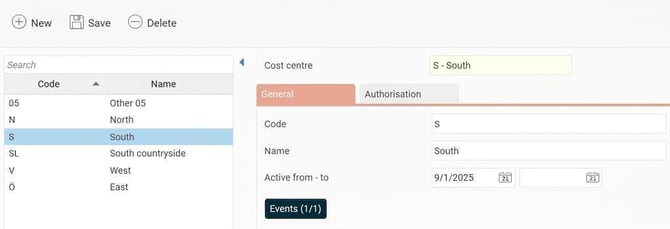
Active from – to: Here you enter or see the date interval for when the account code is active. The account code can only be used for registrations made within the specified interval. If you do not enter any dates, the account code is always active. Inactive account codes appear in reports and can still be used when making selections.
It is not possible to reuse a code for a new item in the account code register. If you want to reuse an inactive code, you cannot create a new one with a later start date, since each account code must have a unique code. Instead, you must reactivate the code by removing the set end date.
Depending on how you use the register, it may have additional settings and tabs, such as Plan, Invoicing and Competences. These are described in the article What is a project register?
Events
If you use HRM Time, the button Events is available in the account code registers. There you can create events applicable per account code. An example could be that a certain extra allowance is paid out for all hours worked at a specific cost centre.
Authorisation for account code registers
It is possible to set authorisation for specific registers. For example, you may be able to edit cost centres but only view the project register. The authority for account code registers can be controlled with company-linked authorisation. Read more here: How does company-bound authorisation work?
The Authorisation tab
The account code registers used for authorisation and selection (the setting is found under Settings > General > Account code dimensions) have a tab called Authorisation.
Within this tab, you can see which users have authorisation via an account code, as well as through which role. The tab is controlled by authorisation and must be enabled on roles that should be able to show Authorisation.
Related articles
How do you manage account code dimensions in Flex HRM?
What is a project register?
What is a customer register?
How do you use Events in HRM Time?
How does company-bound authorisation work?
Please note: This article is AI-translated. This means that linguistic errors or misunderstandings may occur.