
A customer register is one of the company's account code registers expanded with customer details. To set up an account code register as a customer register, go to Settings > General > Account code dimensions.
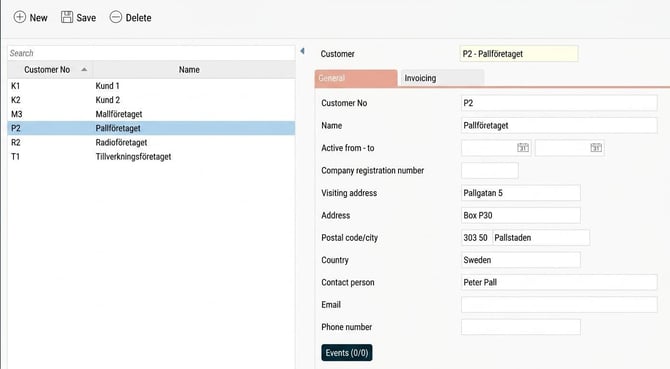
The customer register is a list containing information about a customer:
-
Customer number
-
Name
-
Active
-
Company registration number
-
Visiting address
-
Address
-
Postal code and city
-
Country
-
Contact person
-
Email
-
Phone number
Use of the customer register
The customer register is often used in connection with invoicing. If it is used for this purpose, the register will also have an extra folder called Invoicing. You can find more information about this in the article What is a project register?
Events
If you use HRM Time, the button Events is available in the account code registers. Here, you can create events applicable to each account code. For example, an extra allowance may be paid for all hours worked on a specific customer number.
Authorisation for account code registers
It is possible to set authorisation for specific registers. For example, you may be allowed to edit cost centres but only view the project register. The authority to account code registers can be managed with company-linked authorisation. Read more here: How does company-bound authorisation work?
The Authorisation folder
The account code registers that are used for authorisation and selection (the setting under Settings > General > Account code dimensions) have a folder called Authorisation.
Under this folder, you can see which users have authorisation via an account code, and via which role. The folder is authorisation-controlled and must be activated for the roles that should be able to show Authorisation.
Related articles
How do you manage account code dimensions in Flex HRM?
What is a project register?
What is an account code register?
How do you use Events in HRM Time?
How does company-bound authorisation work?
Please note: This article is AI-translated. This means that linguistic errors or misunderstandings may occur.